> ## Documentation Index
> Fetch the complete documentation index at: https://docs.winedirectfulfillment.com/llms.txt
> Use this file to discover all available pages before exploring further.
# Two-Factor Authentication
> Two-factor authentication allows an added level of security for users within the WineDirect Fulfillment portal. By enabling this optional authentication, users will enter a security code from their mobile device that is automatically generated from one of the authenticator apps available for download. This security step is optional and can be enabled or disabled at any time.
 ## To Enable:
1. Click the username in the upper right-hand corner of the portal screen
## To Enable:
1. Click the username in the upper right-hand corner of the portal screen
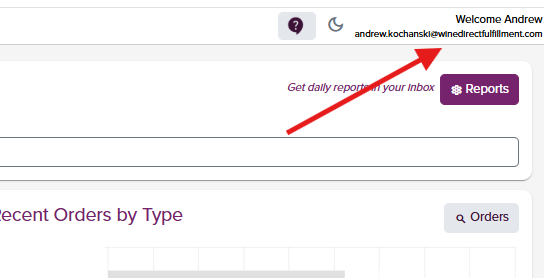 2. Open the app and click the button titled "***I have opened the app on my phone***."
 3. Scan the QR code in the downloaded Authenticiator app:
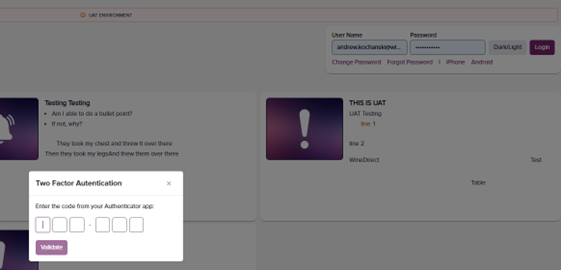
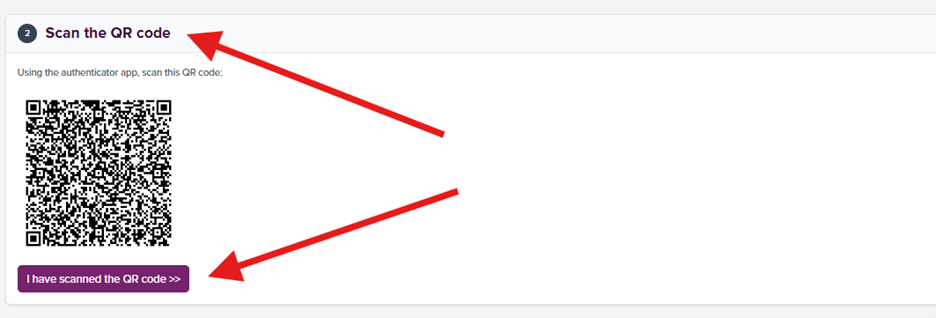 4. Enter the authentication code that is generated on your mobile device and hit "***Verify***"
 5. 2-Factor Authenticiation will be required every 7 days upon Portal login
 ## To Disable:
2 Factor Authentication can only be disabled internally via the settings page. To disable the 2 Factor Authentication, please contact your Account Manager.
## To Disable:
2 Factor Authentication can only be disabled internally via the settings page. To disable the 2 Factor Authentication, please contact your Account Manager.