> ## Documentation Index
> Fetch the complete documentation index at: https://docs.winedirectfulfillment.com/llms.txt
> Use this file to discover all available pages before exploring further.
# Recalling a Package
> How to recall UPS packages directly from the WineDirect Fulfillment portal
We are happy to announce that our ongoing partnership with UPS has allowed us to develop the ability to RECALL UPS orders directly from the WineDirect Fulfillment portal! Similar to Rerouting a Package, clients can continue to take advantage of our intuitive self-service portal and recall or “RTS” any shipment with a live tracking number.
> Please note that this self-service option is only available for UPS packages. For FedEx and GLS (formerly known as GSO) packages, please reach out to the Client Success Team at **[csoperations@winedirectfulfillment.com](mailto:csoperations@winedirectfulfillment.com)**
### Guidelines and Processes
* **Carrier pass-through fees** for the order to be returned to the original sender will be incurred by the winery
* **Packages that have been marked "delivered"** are not eligible for recall
* \*\*"In Transit" packages \*\*are eligible for recall
* Once the recall is submitted, there will be a **delay of one business day** as the request must reach the driver/hub to apply the changes
### Winery Benefits and Processes
Winery benefits and processes vary, depending on which of our services are in place:
**WineDirect Fulfillment Only**: The redirect API enables a winery employee to reroute packages through the Fulfillment portal.
### **How to Recall an Order via the Fulfillment Portal**
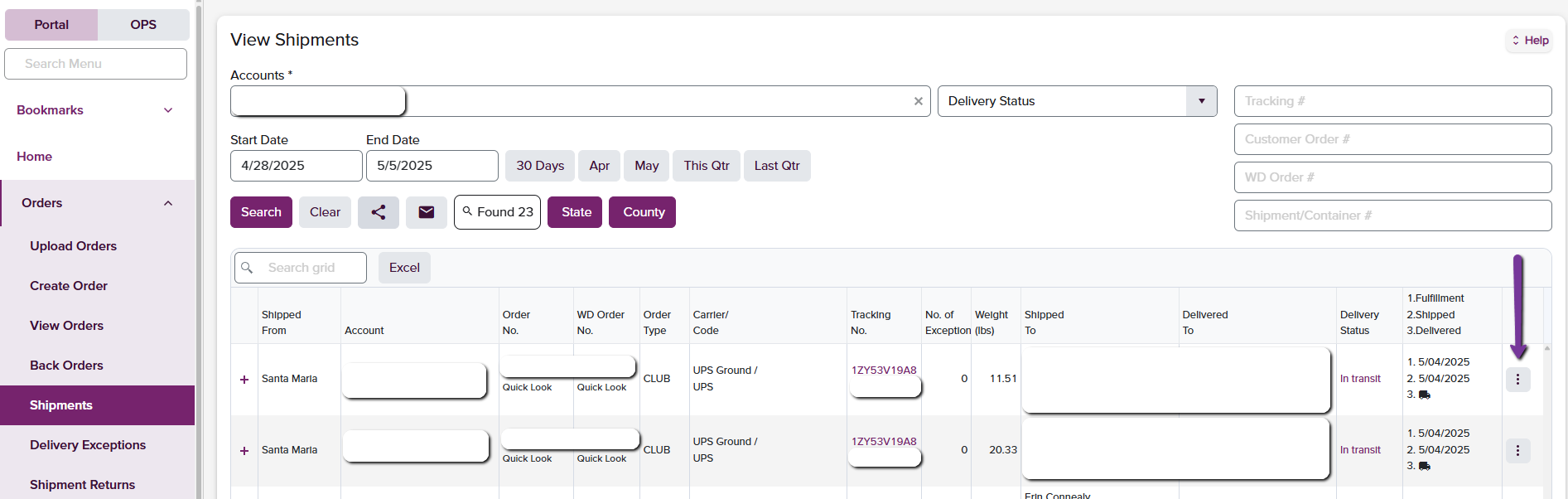
1. Go to the **Shipments** page on the Fulfillment Portal to search for the order using the quick search field or by using the search filters.
2. After submitting "Search", your results will appear in the table below.
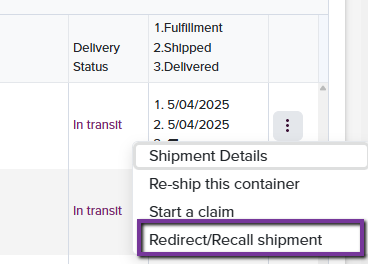
3. Select the **three-dot menu icon** to the right of the tracking number desired and select **Redirect/Recall Shipment**
 4. A box will appear allowing you to make changes to the address. Make any necessary address changes and click **SAVE**. This will send the request straight to the UPS carrier.
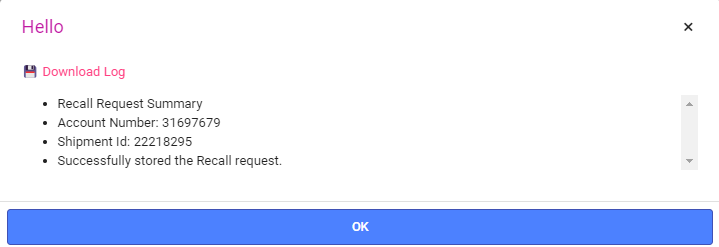
5. Once the Recall has been selected, a confirmation window will appear showing receipt of the action being made:
4. A box will appear allowing you to make changes to the address. Make any necessary address changes and click **SAVE**. This will send the request straight to the UPS carrier.
5. Once the Recall has been selected, a confirmation window will appear showing receipt of the action being made:
 For information on Reroute/Redirecting a package, please see our Rerouting a Package guide.
At this time, in-system rerouting is only available for UPS-level packages. For all other actions and carrier requests, please email: [csoperations@winedirectfulfillmentfulfillment.com](mailto:csoperations@winedirectfulfillmentfulfillment.com)
For information on Reroute/Redirecting a package, please see our Rerouting a Package guide.
At this time, in-system rerouting is only available for UPS-level packages. For all other actions and carrier requests, please email: [csoperations@winedirectfulfillmentfulfillment.com](mailto:csoperations@winedirectfulfillmentfulfillment.com)