> ## Documentation Index
> Fetch the complete documentation index at: https://docs.winedirectfulfillment.com/llms.txt
> Use this file to discover all available pages before exploring further.
# Changing an Address
> How to change shipping addresses for orders before shipment
Addresses can be changed prior to shipment. Please note that addresses can be changed only if the order is **on hold** and not showing a status of **"Sent to WMS."**
## Step-by-Step Process
### Step 1: Find the Order
Go to the **View Orders** page to search for the specific order you would like to change the address.
### Step 2: Access Order Details
Click the link of the order number (either your **"Customer Order No."** or the **"WineDirect Order Number"**). Clicking either number will bring you to the order details page.
### Step 3: Initiate Address Change
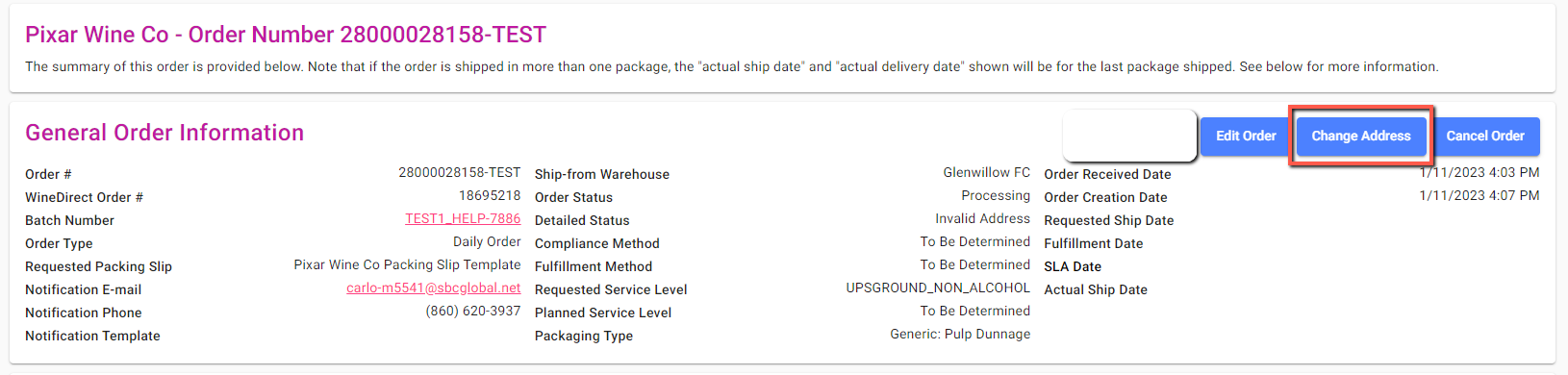
Click on the **"Change the Address"** button at the top of the upper right corner, to proceed with your request.
 ### Step 4: Edit Address Information
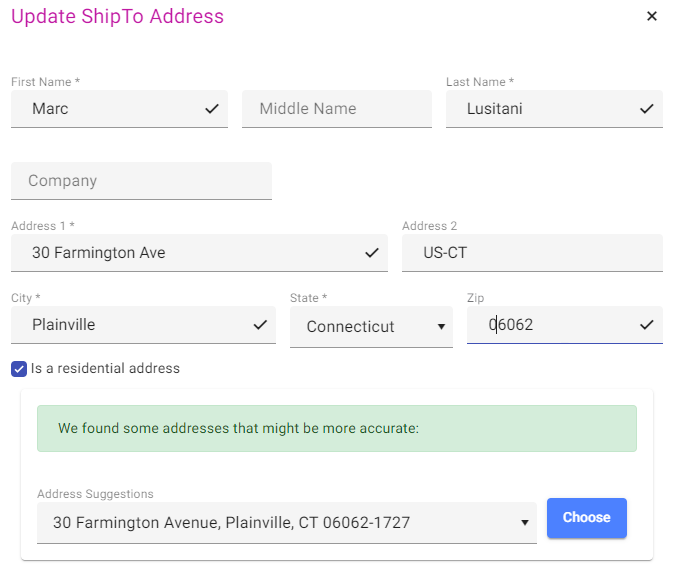
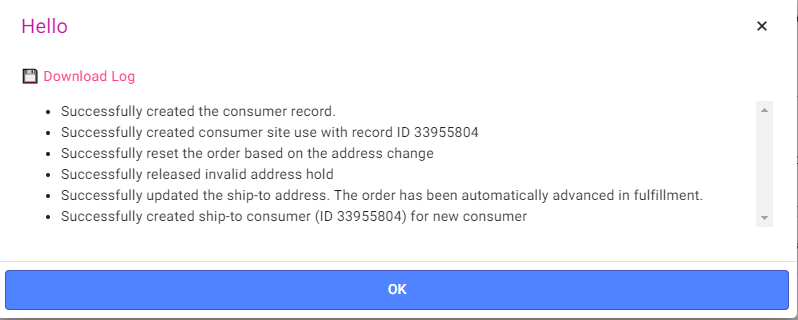
A popup window will appear, and from here you will be able to make changes.
Please note that each line has a character limitation as outlined below:
* **Name**: 30 characters (including spaces)
* **Company Name**: 30 characters (including spaces)
* **Address Line 1**: 30 characters (including spaces)
* **Address Line 2**: 8 characters (including spaces)
### Step 4: Edit Address Information
A popup window will appear, and from here you will be able to make changes.
Please note that each line has a character limitation as outlined below:
* **Name**: 30 characters (including spaces)
* **Company Name**: 30 characters (including spaces)
* **Address Line 1**: 30 characters (including spaces)
* **Address Line 2**: 8 characters (including spaces)
 ## Best Practices
More information on our [address corrections page here](https://docs.winedirect.com/winedirect-fufillment-docs/docs/address-corrections)!
Download USPS abbreviated city and states used by UPS/FedEx [HERE](https://documentation.winedirect.com/assets/client/File/USPS%20ABBREVIATED%20CITY%20AND%20STATE.pdf).
***
**Important**: Address changes can only be made for orders that are on hold and have not been sent to the warehouse management system (WMS).
Please email [Csoperations@winedirect.com](mailto:Csoperations@winedirect.com) or call 707-603-4011 if you have any questions or need additional information.
## Best Practices
More information on our [address corrections page here](https://docs.winedirect.com/winedirect-fufillment-docs/docs/address-corrections)!
Download USPS abbreviated city and states used by UPS/FedEx [HERE](https://documentation.winedirect.com/assets/client/File/USPS%20ABBREVIATED%20CITY%20AND%20STATE.pdf).
***
**Important**: Address changes can only be made for orders that are on hold and have not been sent to the warehouse management system (WMS).
Please email [Csoperations@winedirect.com](mailto:Csoperations@winedirect.com) or call 707-603-4011 if you have any questions or need additional information.