> ## Documentation Index
> Fetch the complete documentation index at: https://docs.winedirectfulfillment.com/llms.txt
> Use this file to discover all available pages before exploring further.
# Release Weather Holds
> This article will provide step-by-step instructions on how best to search for and release orders from Weather Holds and Weather Hold configurations as a whole.
There are now several search fields that can be applied to allow you to select multiple orders on hold under a Weather Hold.
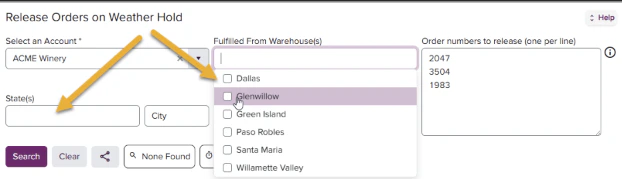 New! Multiple specific order numbers can now be added to the search query as pictured above!
### Release Weather Holds
1. Use the search fields to populate your desired results
New! Select and search by zip code to narrow your results even further!
New! Multiple specific order numbers can now be added to the search query as pictured above!
### Release Weather Holds
1. Use the search fields to populate your desired results
New! Select and search by zip code to narrow your results even further!
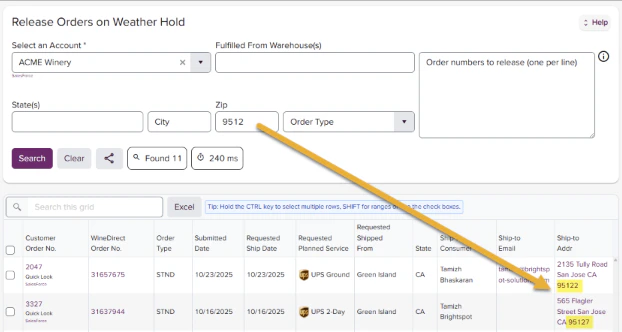 2. Select all applicable orders by clicking the box to the left of the order and click the Release \_\_\_\_ Orders button:
 Orders released from Weather Holds before 1 p.m. will follow normal SLA and ship the day they are released.