> ## Documentation Index
> Fetch the complete documentation index at: https://docs.winedirectfulfillment.com/llms.txt
> Use this file to discover all available pages before exploring further.
# Transfers: Inter-Center Transfers
> Complete guide to creating and managing Inter-Center Transfer requests between WineDirect warehouses
## What is an Inter-Center Transfer?
The Inter-Center Transfer process allows clients to create an inventory movement submission that grants the client full visibility into each stage of the inventory move from one warehouse to another.
## How does the Inter-Center Transfer benefit our clients?
**Key Customer Benefits:** • Bypass the OUT fees traditionally incurred via Inter-Center Transfers • Automated billing: system-generated billing based on actual transfer quantities • Increased Inventory Visibility through the Inter-center transfer process: o Inventory moves from
1. Origin sub-Inventory
2. Reserve for Warehouse Transfer sub-inventory
3. In Transit for Warehouse Transfer sub-inventory
4. Destination sub-Inventory
## How to Create an Inter-Center Transfer
From the fulfillment portal home page, click: **Products-> Inter-Center Transfers Create-> Create:**
 1. Complete the following fields:
* Select a Supplier: Name of Winery
* Reference Number: Unique ID
* Email: Email of the user submitting the transfer
* From Warehouse: The WineDirect Fulfillment warehouse, where the inventory originates from
* To Warehouse: The WineDirect Fulfillment warehouse, where the inventory is transferred to
* Transfer Type: warehouse transfer
2. Click **Add Products** to move to the next section and begin adding SKUs. As you begin typing the SKU, the SKU will populate in the dropdown listing how many bottles and all sub-inventories it is available within in the originating warehouse.
1. Complete the following fields:
* Select a Supplier: Name of Winery
* Reference Number: Unique ID
* Email: Email of the user submitting the transfer
* From Warehouse: The WineDirect Fulfillment warehouse, where the inventory originates from
* To Warehouse: The WineDirect Fulfillment warehouse, where the inventory is transferred to
* Transfer Type: warehouse transfer
2. Click **Add Products** to move to the next section and begin adding SKUs. As you begin typing the SKU, the SKU will populate in the dropdown listing how many bottles and all sub-inventories it is available within in the originating warehouse.
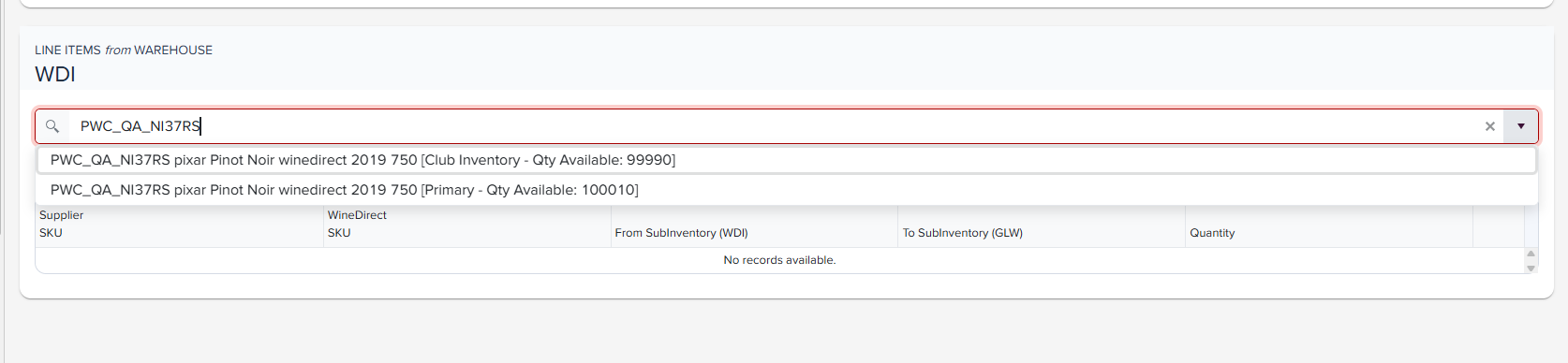 3. Select the sub-inventory that the transfer will be accepted into at the arrival facility:
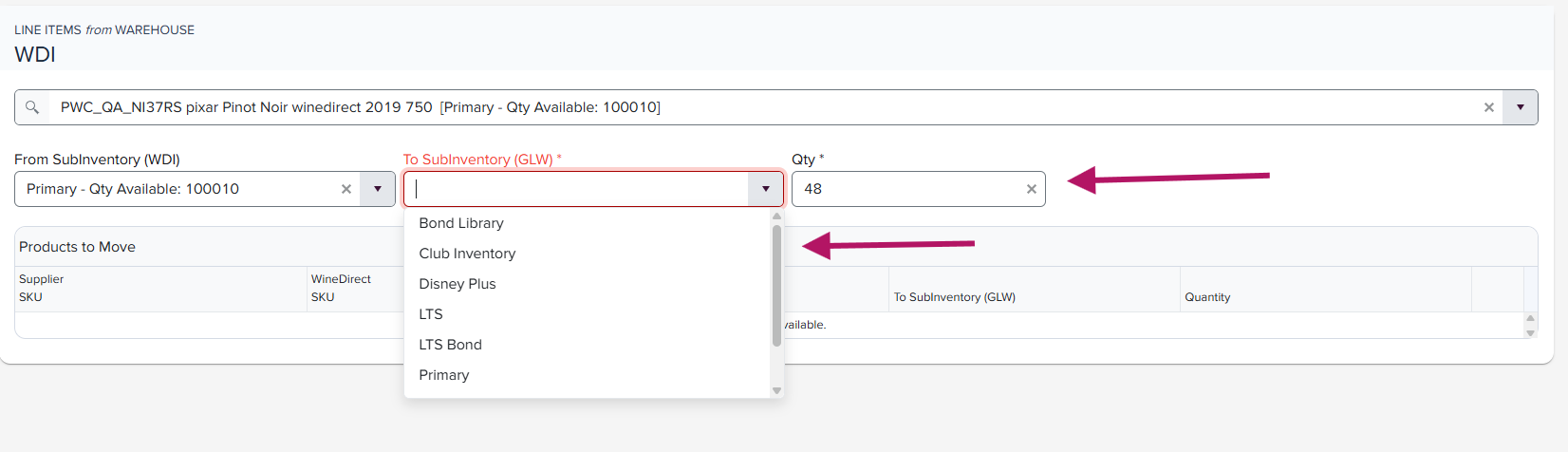 4. Click **Add** to add the line item SKU, and repeat this action to list all applicable SKUs to move in the transfer:
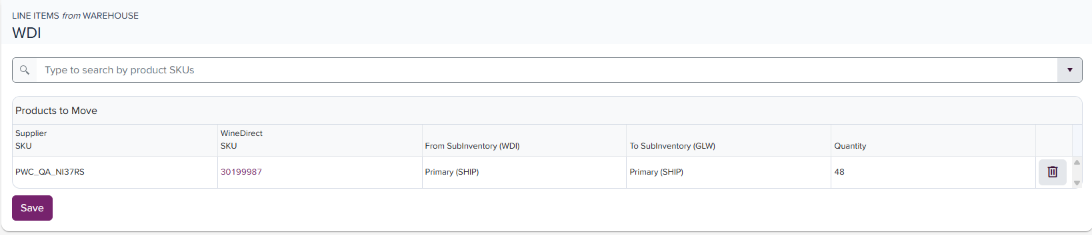 5. Click **Save** when all SKUs have been listed. This will take you to the final draft of the transfer, allowing you to review before clicking **Submit**:
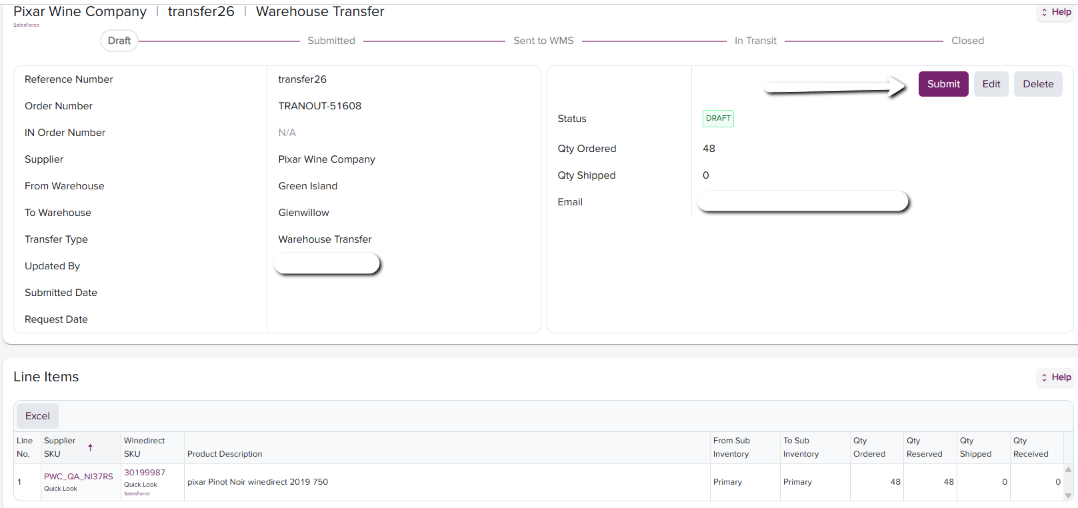 ## Canceling an Inter-Center Transfer
In the event you need to cancel an Inter-Center Transfer before it has been submitted:
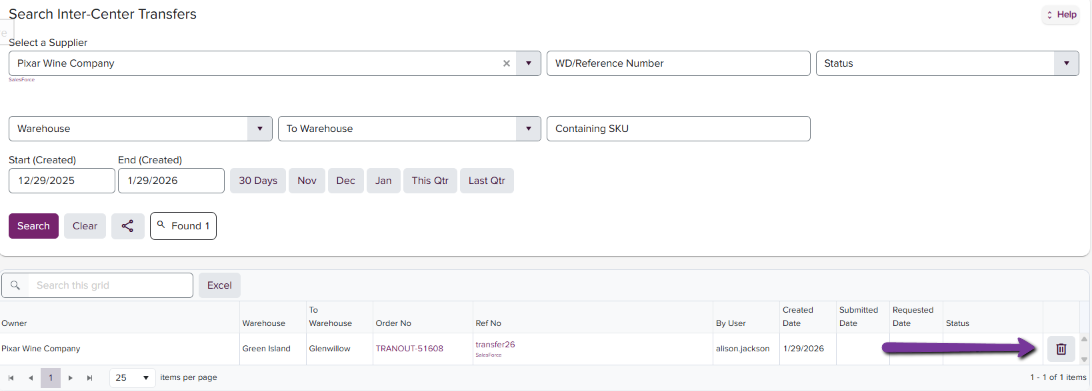
* Find and click on "Search Inter-Center Transfer."
* Locate and click on the 3-dot icon near the right-hand side of the page
* Select Delete
* A small window will appear asking to confirm deleting the specific Inter-Center Transfer number
* Click on the "Confirm" icon
## Canceling an Inter-Center Transfer
In the event you need to cancel an Inter-Center Transfer before it has been submitted:
* Find and click on "Search Inter-Center Transfer."
* Locate and click on the 3-dot icon near the right-hand side of the page
* Select Delete
* A small window will appear asking to confirm deleting the specific Inter-Center Transfer number
* Click on the "Confirm" icon
 ## Inter-Center Transfer Schedule:
WineDirect Fulfillment offers weekly temperature -controlled truck services from our West Coast facilities, CA facility, to our Glenwillow (GLW), OH facility to enable bi-coastal shipping. Please refer to your Rate Card for your Inter-Center Transfer rate. For Clubs, delivery to WineDirect Fulfillment is recommended 4 weeks before the ship date out of GLW.
[Click here for a .pdf of our transfer schedule](https://winedirectfulfillment.com/wp-content/uploads/2026/01/Transfer_Schedule.pdf)
## Inter-Center Transfer Schedule:
WineDirect Fulfillment offers weekly temperature -controlled truck services from our West Coast facilities, CA facility, to our Glenwillow (GLW), OH facility to enable bi-coastal shipping. Please refer to your Rate Card for your Inter-Center Transfer rate. For Clubs, delivery to WineDirect Fulfillment is recommended 4 weeks before the ship date out of GLW.
[Click here for a .pdf of our transfer schedule](https://winedirectfulfillment.com/wp-content/uploads/2026/01/Transfer_Schedule.pdf)