

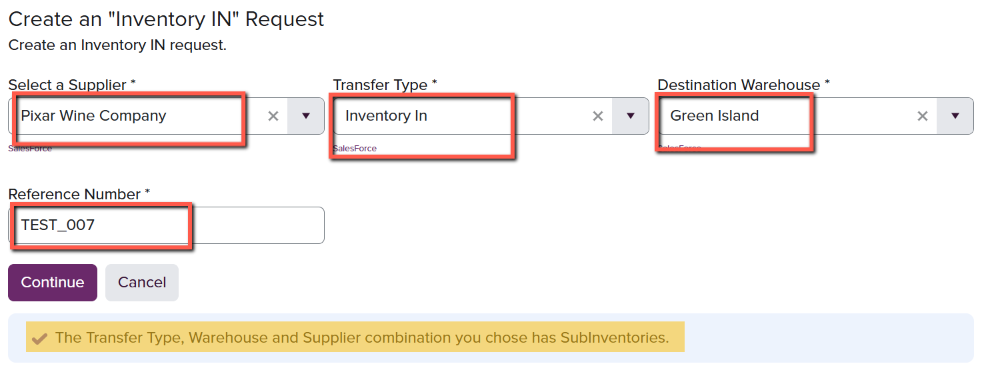
- Bonded Inventory In Use for non-Taxpaid inventory from the Customer’s Bonded location to WineDirect’s Bonded inventory.
- Long-Term Inventory In Use for Taxpaid inventory not expected to move through Fulfillment orders.
- Inventory In (Short Term) Use for Taxpaid inventory expected to move through Fulfillment orders.
- Glenwillow
- Green Island
- Paso Robles
- Santa Maria
- Willamette Valley
General Information
The first category, General Information, will list the fields that were previously completed: Reference Number, Vendor, Warehouse, Transfer Type & when the submission was created, submitted and closed.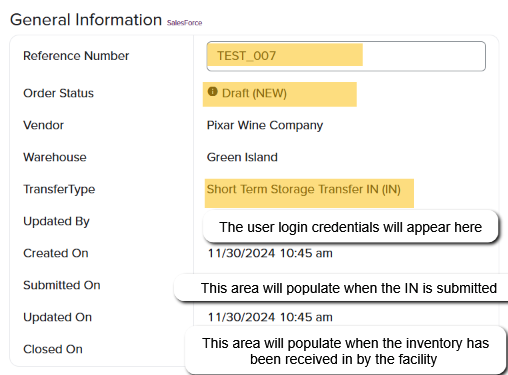
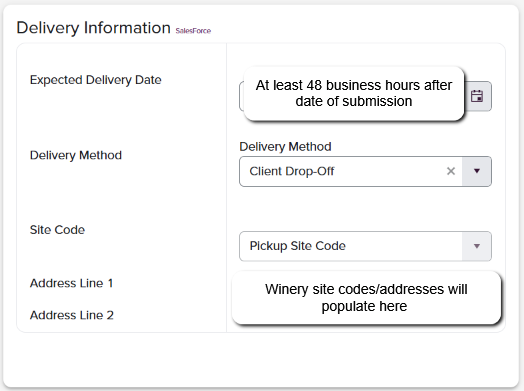
Delivery Information
The next section titled **Delivery Information **will house the fields needing completion for location and timing of transfer: Expected Delivery Date: WineDirect requests that all Inventory IN submissions are submitted at least 48 hours/ two (2) business days in advance of physical movement. For example, if the submission is created on Monday, the earliest expected delivery date would be Wednesday. Delivery Method:- Client Drop-Off: representation from the winery will physically deliver the inventory submitted.
- WineDirect Pickup: if this is selected, a driver from the designated WineDirect fulfillment house will collect the submitted inventory from the requested address supplied in the next section.
Line Items
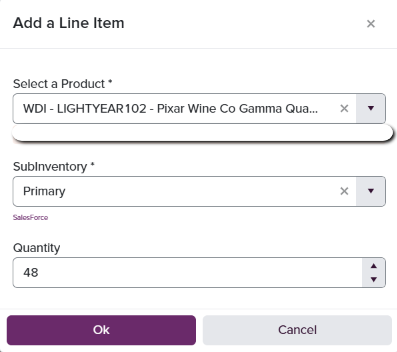
This section allows the client to enter the SKUs requested on the submission. There are a few different ways to add the SKUs; via adding a Line Item (SKU) line by line, or by downloading a template which will allow the user to add a large amount of SKUs at once and upload the form into the system.
- SKU: the specific SKU names of the product(s)
- Subinventory: the specific subinventory that the user requests the received inventory placed into. Note: only one subinventory can be used per Inventory IN submission. To re-allocate product into subinventories after initial receipt, please use the Move Inventory feature.
- Quantity: units of each SKU requested. For wine product, quantity in bottles must be used.
- Select the Subinventory the requested product will be received into
- Add the quantity units of each SKU requested. For wine product, quantity in bottles must be used.
Notes
The form contains a section titled Notes which allows for the user to include any information specific to the collection or delivery of requested inventory. For example, if a specific gate code or phone number should be communicated to our warehouse driver.
Submit
Once all of the requested SKUs have been entered, the form will need to be submitted by clicking the Submit button. This will save the form and send it to the appropriate warehouse team to prepare for staging. As the submission moves through the execution stage with the fulfillment team, the user will be able to view the progression status on the top right corner of the IN submission.