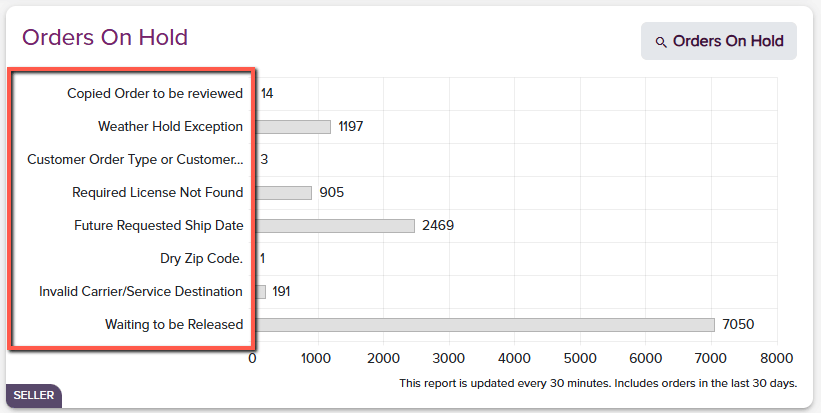
| 001 - WineDirect Fulfillment Action In Progress | WineDirect Fulfillment action is currently in progress; no action needed from the client |
| 005 - WineDirect Fulfillment Action In Progress | WineDirect Fulfillment action is currently in progress; no action needed from the client |
| 006- WineDirect Fulfillment Action in Progress | WineDirect Fulfillment action is currently in progress; no action needed from the client |
| 007 - WineDirect Fulfillment Action In Progress | WineDirect Fulfillment action is currently in progress; no action needed from the client |
| Active Cutoff Profile Not Found | Cutoff profile not configured, WineDirect Fulfillment action required. |
| Address Length Exception | The Shipping Address is too long for the carrier label. Edit the address to shorten the address lines. |
| Auto Release Configuration Exception | Auto Release configuration issue, contact Client Success for resolution. |
| Billing Exception | An issue occurred while the order was processed for billing. WineDirect Fulfillment action required. |
| Carrier Requirements Exception | Carrier requirements do not match the order or configuration needs correction. |
| Carrier: [Carrier] |
| Service Level/Priority: [Service Level] |
| State: [State Code] |
| Zip Code: [Zip Code] |
| Carrier Validation Error | Carrier Validation failed after max retries. WineDirect Fulfillment action is currently in progress. No action needed from the client. |
| Client Account Exception | Customer account is currently on shipping hold. Contact WineDirect Fulfillment for resolution. |
| CoolPack Exception | Order contains items incompatible with CoolPack Packaging or has multiple CoolPacks on the order. |
| Fulfillment Center Configuration Exception | The Fulfillment Center on the order is not configured, or a fulfillment center configuration is missing. |
| Future Requested Ship Date Hold | Future Requested Ship Date: |
| Ship Date: [Date] |
| Insufficient Inventory Exception | Insufficient inventory for the following ordered products: |
| Product(s): [Product1, Product2 …] |
| Order Type Configuration Exception | Customer Order Type Detail configuration is missing. |
| Order Type: [Order Type] |
| Order Type Configuration Not Found | Customer order type configuration is missing. |
| Order Type: [Order Type] |
| Pending Carrier Validation | Carrier Validation in process. Edits can still be made to the order. The hold will remove automatically once complete. |
| Product Registration Configuration Exception | Product registration is not available. Work with Client Success to verify product configuration. |
| Product(s): [Product1, Product2 …] |
| Requested Seller Product Not Found | One or more products on the order are not configured: |
| Product(s): [Product1, Product2 …] |
| Requested Service Level Configuration Exception | An issue with the requested service level configuration has occurred; WineDirect Fulfillment action required. |
| Requested SKUs Not Found | The following SKUs were not found in the WineDirect Fulfillment system: |
| [SKU1] |
| [SKU2] |
| … |
| Required License Not Found | Required license not found. |
| State: [State] |
| License: [Required License] |
| Required Order Details Not Found | Order contents do not meet order requirements. Review the order and make corrections. |
| Required Permit Not Found | Permit for the ordered items not found. |
| Product(s) without permits: [Products1, Product2 …] |
| Required Seller Details Not Found | Account configuration is missing required details. WineDirect Fulfillment action required. |
| SEQ - WineDirect Fulfillment Action In Progress | WineDirectFulfillment action is currently in progress. |
| Ship To Address Exception | Ship to address cannot be a PO Box for wine shipments. |
| Ship To Address or Requested Service Level Not Found | Ship To address elements or the requested service level are missing. |
| Ship To Zip Code Exception | The ship to Zip Code is a dry zip code or does not match the ship to state. |
| [Dry region State Code] |
| [Zip Code does not match state State: State Code, Zip Code: Zip Code] |
| Shipment Processing Exception | Shipment processing error, WineDirect Fulfillment action required. |
| Shipping Channel Not Found | A Shipping Channel for this order was not found. Please contact Client Success to resolve. |
| Order Category: Wine or Non-Wine |
| State: State Code |
| Ship From Warehouse: Warehouse |
| Shipping Instructions Hold | Order held for Shipping Instructions. |
| Shipping Instructions: Shipping Instructions |
| VAL - WineDirect Fulfillment Action In Progress | WineDirect Fulfillment action is currently in progress. |
| Volume Limit Exception | Order Exceeds Volume Limit for the destination state. |
| State: State Code |
| Volume Limit Rule: Rule Name |
| Order Volume: XXX ml |
| Waiting to be Released | Clear of standard holds. Waiting to be released by the Operations team. Edits can be made. **No action is needed from the client. ** |
| Weather Hold | Order on Weather Hold: |
| WMS - WineDirect Fulfillment Action In Progress | WineDirect Fulfillment action is currently in progress. |