

New enhancement for Weather Holds!
Users can now add multiple warehouses and states at one time via the Weather Hold configuration tool.
Users can now add multiple warehouses and states at one time via the Weather Hold configuration tool.
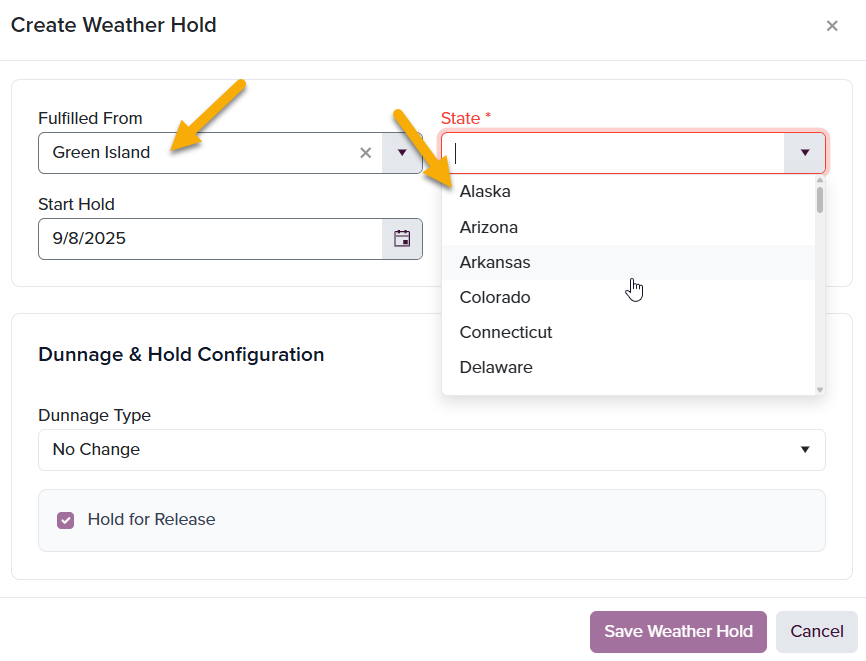
To Create a Weather Hold:
- Select Fulfilled From (the warehouse in which your orders will be shipping out of - select all that apply)
- Select State (the state(s) that will be placed on hold; states that orders are destined to ship to -select all that apply) New! Multi-select Warehouse and State values enhancement!
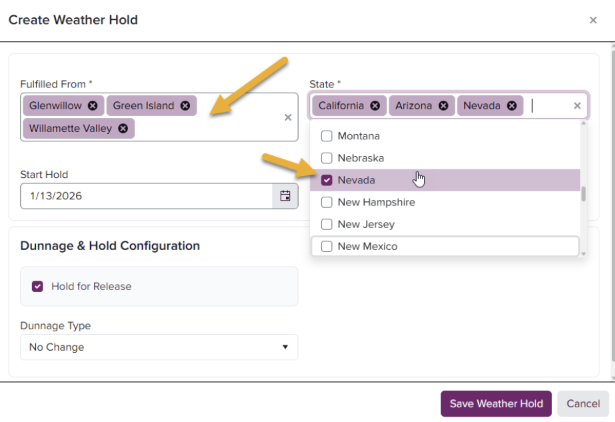
-
Select Start Hold and **End Hold **dates from the calendar pop-up
- Start Hold: the date at which orders will begin to hold in the system and will not ship.
- End Hold: the date at which orders will be automatically released from the system to ship to the designated state.
- Due to the unpredictability of the weather, it is highly recommended that the End Hold be left blank, allowing you and your team to manually release the Weather Hold upon confirmation of the forecast.
If an End Date is applied, the system will release all orders destined to selected states upon the configured End Date, regardless of weather. -
Dunnage and Hold Configuration
_Dunnage is the addition of any coolpack preference into any and all containers configured for that selection of state(s) and Start/End Hold dates. WineDirect Fulfillment is proud to announce that we are solely using EcoCool pack ice bricks for all of our orders, and you can select EcoCool pack from the dropdown provided. _
Don’t wish to add COOLPACK SKUs to every order? You no longer have to! Selecting the Dunnage Type will add the EcoCool pack into each order for you!
- Hold for Release:
- If this box is checked, orders including dunnage (addition of EcoCool pack) will remain on hold, abiding by the configuration start and end date.
- If this box is unchecked, orders including dunnage will not follow any weather hold start and end date configuration.
- Dunnage Type:
- Select EcoCool from the dropdown
- Hold for Release:
- Click Save Weather Hold