

Please note that this self-service option is only available for UPS packages. For FedEx and GLS (formerly known as GSO) packages, please reach out to the Client Success team at: csoperations@winedirectfulfillment.com
Guidelines and Processes
Carrier costs and eligibility:- Carrier pass-through fees plus the difference in carrier costs (between the old and new addresses) will be incurred by the winery.
- Packages that have been “delivered” are not eligible for rerouting.
- “In transit” packages are eligible for rerouting.
- Once the redirect is submitted, a one-business-day delay will occur as the request must be processed by the driver/hub to apply the changes.
- Due to varying state laws, the reroute address must be in the same state as the original order destination.
HOW TO PROCEED WITH REROUTING VIA THE FULFILLMENT PORTAL
- Go to the Shipments page on the Fulfillment Portal to search for the order using the quick search field or by using the search filters.
- After submitting “Search”, your results will appear in the table below.
- Select the three-dot menu icon to the right of the tracking number desired and select the reroute option:

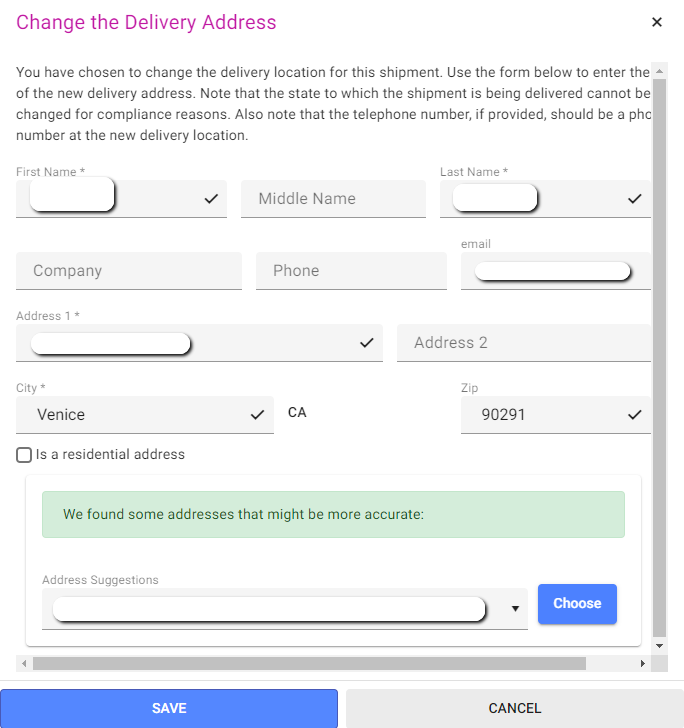
- A box will appear allowing you to make changes to the address. Make any necessary address changes and click SAVE. This will send the request straight to the UPS carrier:
At this time, in-system rerouting is only available for UPS-level packages. For all other actions and carrier requests, please email: csoperations@winedirectfulfillment.com